Visualize Test Day Performance Trends with PLOT
Question: How can I visualize and compare test day milk and component trends for individual animals or groups in DairyComp?
Answer: Use the PLOT command to visualize test day performance trends for individual animals or groups.
PLOT lets you display one or more numeric items (such as milk production or fat percentage) as curves on a graph or as raw data tables. You can also compare two groups on the same graph or break down results by categories like lactation group, cow breed, or test day pen. This function is helpful for analyzing production patterns, monitoring herd performance, and benchmarking different animal groups over time.
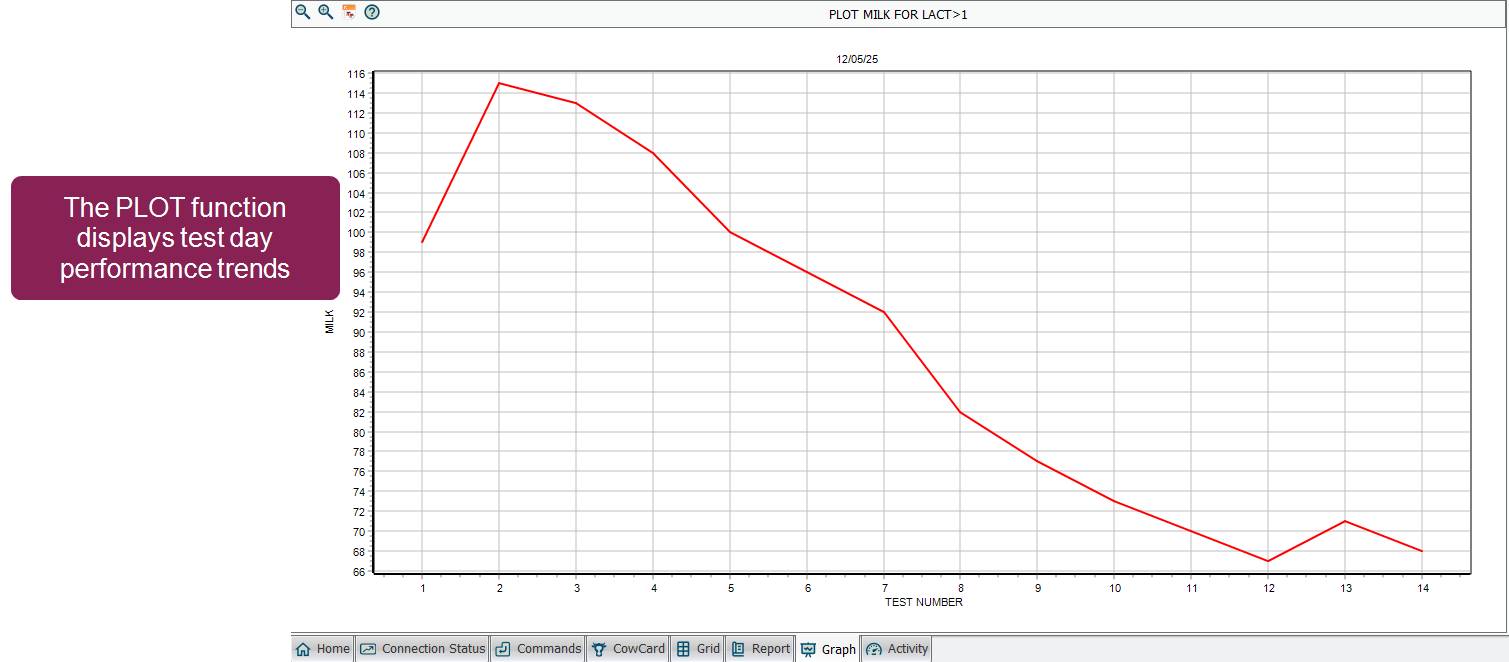
Unlike the GRAPH or EGRAPH functions, which focus on items or events, PLOT is specifically designed for historical test day data. It can show trends across multiple tests, helping you understand changes in performance over time.
You can run the PLOT function using selection windows to choose the item(s) you want displayed. Alternatively, you can add parameters to the PLOT command directly in the command line.
 Run PLOT using the Selection Windows
The easiest way to use the PLOT function is through selection windows that guide you through the process. To do so:
-
Enter PLOT in the command line.
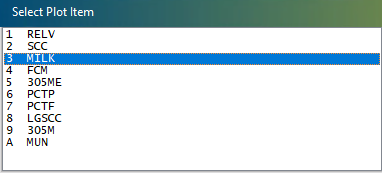
A window displays for selecting a test day item, such as MILK (milk production), PCTF (percent fat), or SCC (somatic cell count):
-
Select the item you want to plot and click OK.
A similar window appears asking you to select a second item.
-
Select the second item to plot and click OK (or press Escape to plot only one item).
-
Enter the applicable animal ID, then click OK.
After you enter the animal ID, the PLOT function generates a graph showing the selected item(s) across all recorded test days for that animal.
Understanding the PLOT Output
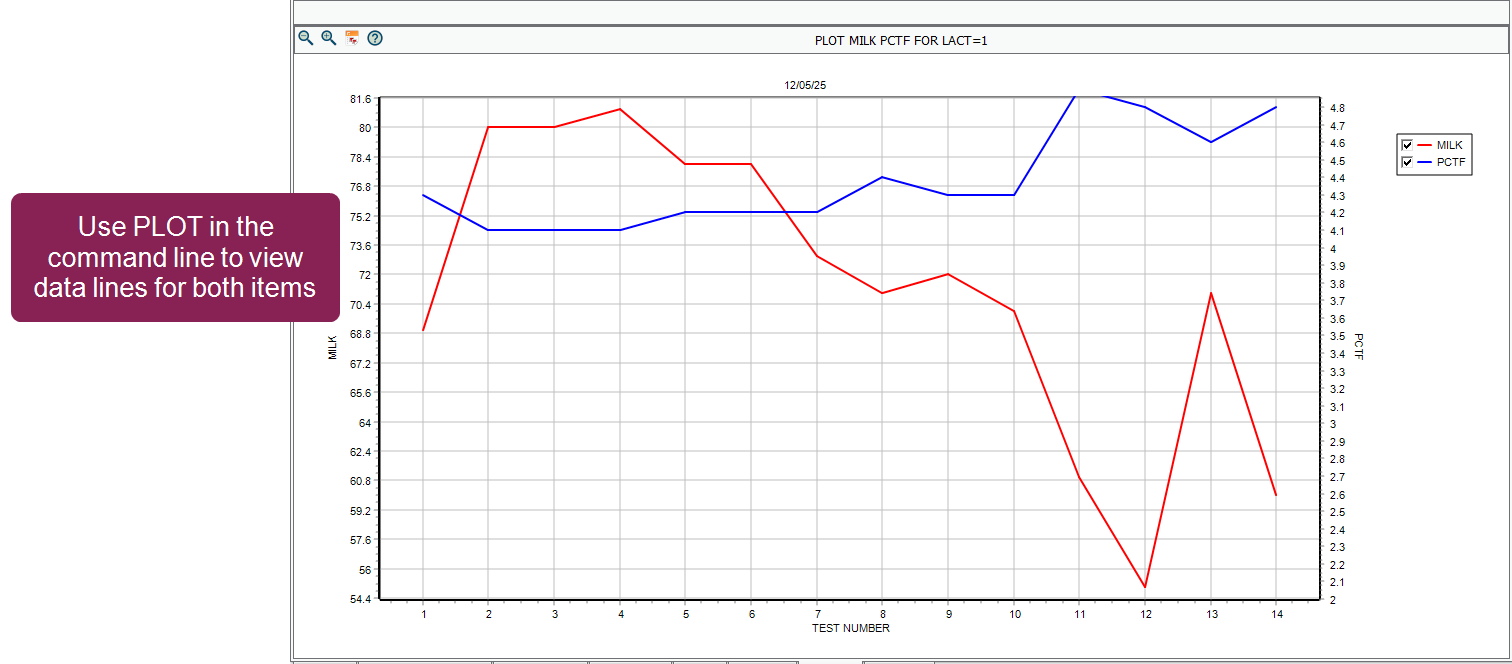
An example PLOT graph is shown below, illustrating how the function displays test day data for an individual animal. In the example, MILK and PCTF were selected.
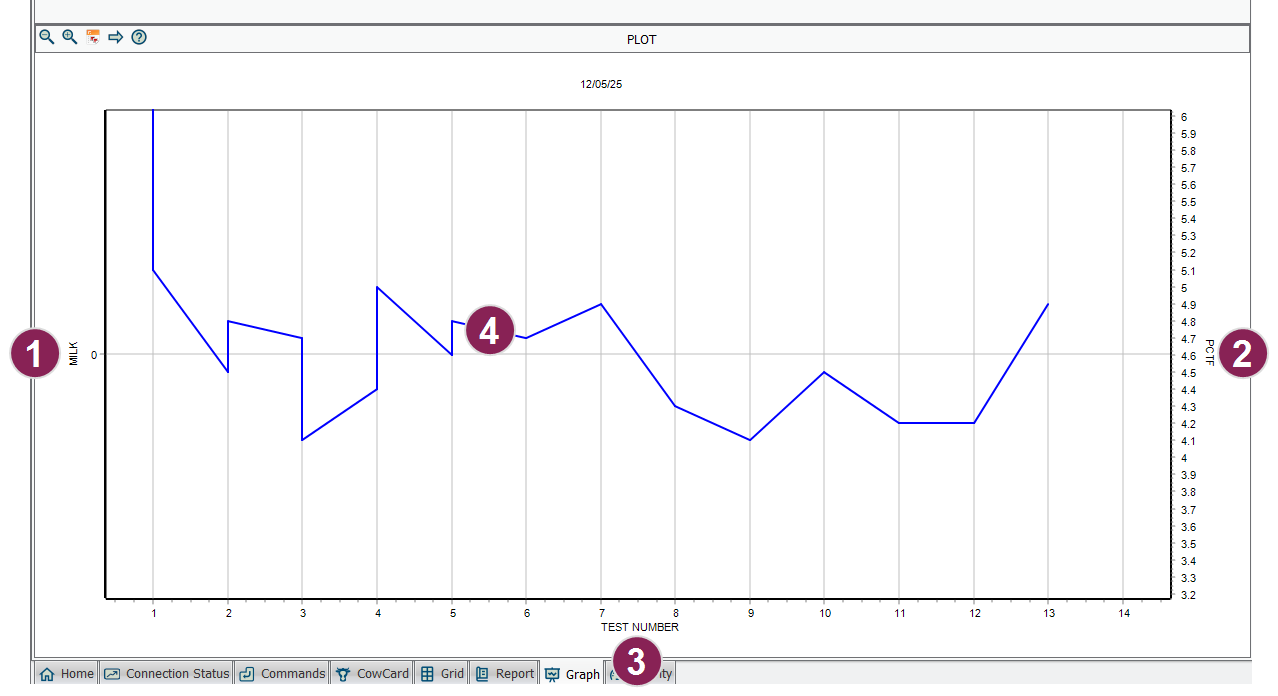
- The left vertical axis shows the scale for the primary item (MILK, in pounds). In this specific view, this axis is displayed for reference.
- The right vertical axis shows the scale for the secondary item (PCTF, percent fat). This is the item currently represented by the blue data line.
- The horizontal axis, labeled TEST NUMBER, shows the sequence of recorded test days.
- The blue data line represents the second item (PCTF) across test days. Each point corresponds to the animal's recorded fat percentage for that specific test.
When you select two items interactively, the graph defaults to showing the data line for the second item selected while keeping both axes for reference. To see both items as separate, simultaneous lines, you must use the command line or group plotting options described below.
Adjusting Plot Settings with the Options Button
Once a graph is displayed, you don't need to exit and restart the command to change your view. Click the Options button in the upper-right corner of the graph screen to open the Options window.

From this window, you can quickly adjust the following parameters:
-
Change Items: Select a different numeric item to plot (e.g., switch from MILK to SCC or 305ME) without re-entering the command.
-
Toggle Grouping: Switch the horizontal axis between TEST NUMBER and TEST DATE \R.
-
Filter by Lactation: Check or uncheck specific lactation groups (e.g., LACT=1, LACT=2, or LACT>2) to show or hide their curves on the graph.
-
Adjust Date Ranges: Manually enter a Start Date \D or End Date \E to focus on a specific time period.
After making your changes, click Go to instantly update the graph with your new settings.
Plotting Groups and Advanced Options
You can use PLOT to analyze groups instead of individual animals. Add a FOR statement to filter the population. For example, the command PLOT MILK PCTF FOR LACT=1 plots milk production for all first-lactation animals, producing a graph with two lines and a legend:
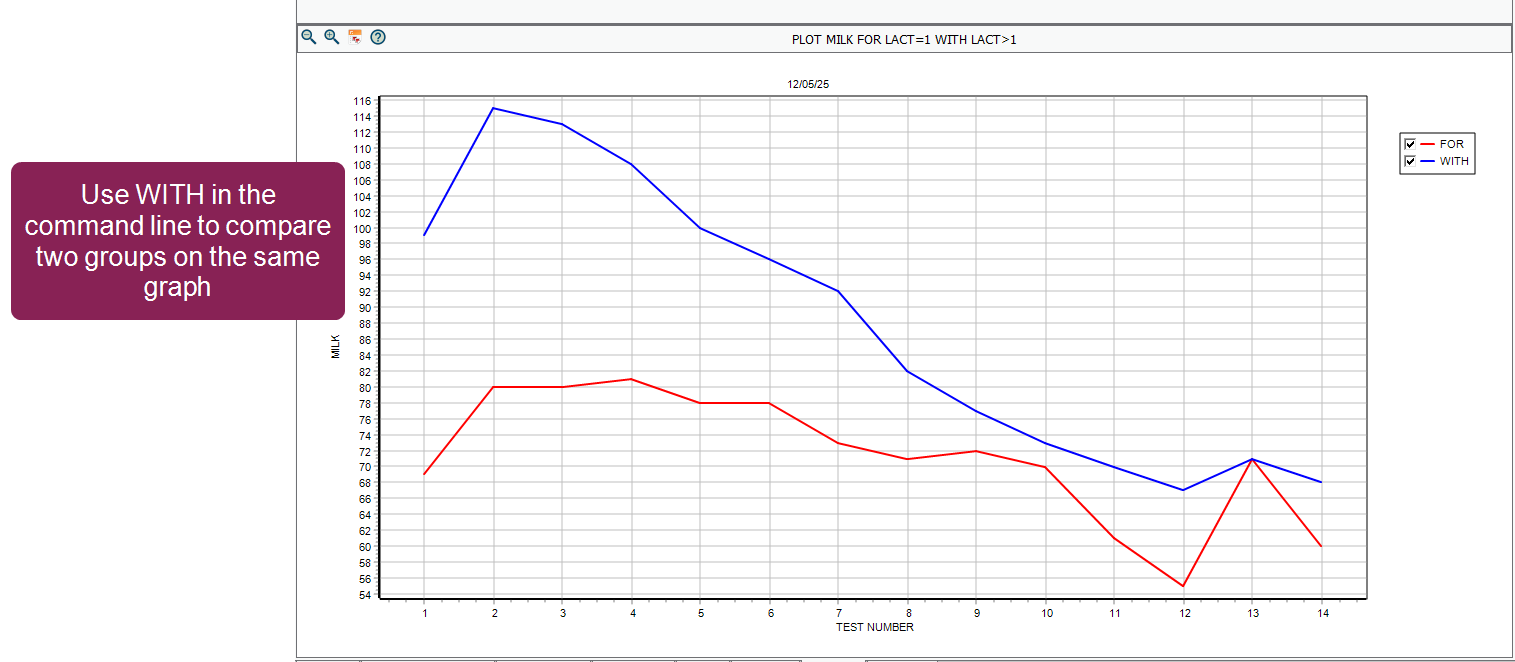
To compare two groups on the same graph, add a WITH statement. For example, PLOT MILK FOR LACT=1 WITH LACT>1 plots first-lactation animals and overlays mature animals on the same graph:
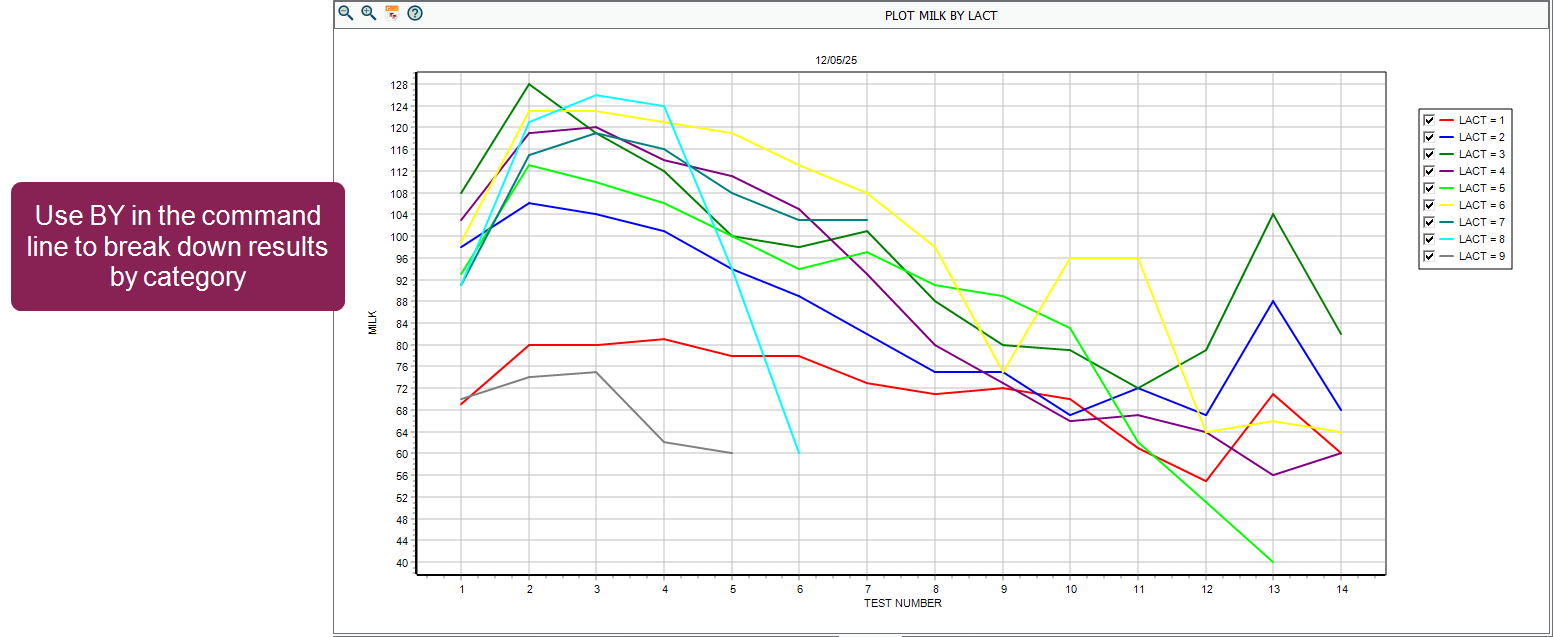
To break down results by category, add a BY statement. For example, PLOT MILK BY LACT displays multiple curves for each lactation group on one graph. You can also group by other items like cow breed or test day pen (e.g., TPEN).
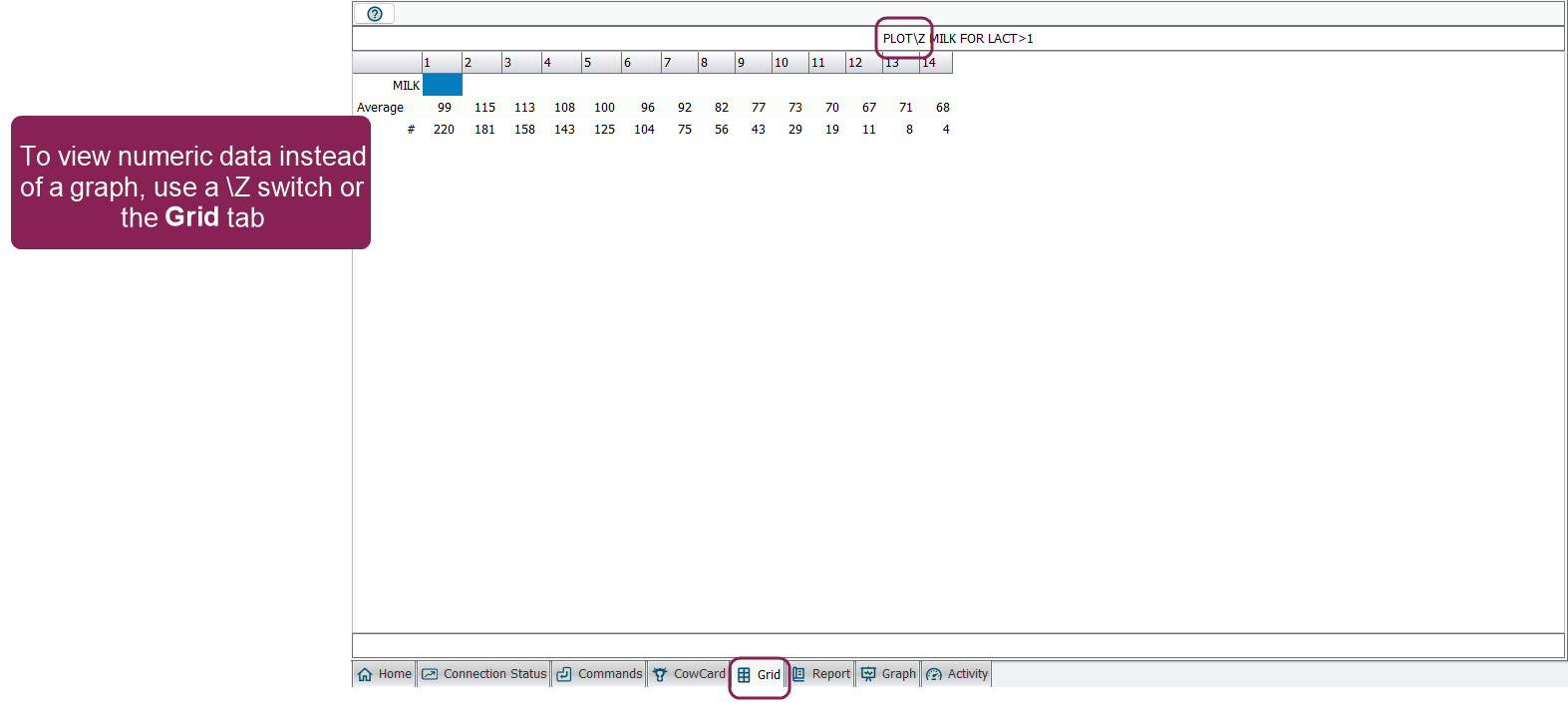
You can use the \Z switch to show raw data tables instead of a graph (or simply click the Grid tab). These tables list the average values and the animal count (the number of animals included in that average) for each test day. This is often used for in-depth analysis where you need to see the specific numbers behind the curves.
Data Grouping
By default, PLOT groups data by test number (Test 1, Test 2, etc.). In this mode, the graph only includes active animals and their current lactation data.
To see herd-level trends over a chronological timeline, use the \R (Reverse axis) switch. This changes the horizontal axis from test numbers to actual test dates, allowing you to spot seasonal changes or evaluate overall herd performance over time.
Examples of Plotting by Date:
-
PLOT MILK\R: Plots average milk production for the herd by test date.
-
PLOT MILK PCTF\R: Plots milk and fat percentage together by test date.
Unlike the standard view, using the \R switch includes data from both live and dead/sold animals, as well as both current and previous lactations. This makes it a powerful tool for historical analysis. To narrow your focus to a specific historical period, combine it with the \D switch (e.g., PLOT MILK\RD) to prompt for a specific date range.
Common Command Line Switches
You can combine multiple switches at the end of a command without spaces (for example, \MRZ). Common switches include:
-
\Z (Table mode): Displays raw numeric data instead of a graph.
-
\M (Manual scaling): Sets custom axis ranges for the graph.
-
\Y (Infection rates): When plotting SCC, breaks data into status groups.
-
\R (Reverse axis): Chronologically groups data by test date instead of test number and includes historical (dead/previous lactation) data.
-
\T (Tall mode): Increases the number of increments on the vertical axis (from 16 to 32).
-
\B (Blank lines): Inserts blank lines between BY groups for easier reading.
-
\D (Dates): Prompts for a specific date range for the plot (useful for analyzing specific years or seasons).
-
\E (Ending date): Sets an ending date for the plot.
-
\L (Archived): Includes archived test data in the plot.